What's New in DataFlex 2026
DataFlex 2026 introduces the DataFlex Package Manager and df-cli, Web Control Loading Optimizations, Web Control Dark Mode and more.
Changes Between Releases
This page lists all new features in DataFlex 2026.
See DataFlex 2026 Release Candidate 2 Changes for the specific list of changes between Release Candidate 1 and Release Candidate 2.
See DataFlex 2026 Release Candidate 1 Changes for the specific list of changes between Beta 1 and Release Candidate 1.
See DataFlex 2026 Beta 1 Changes for the specific list of changes between Alpha 2 and Beta 1.
See DataFlex 2026 Alpha 2 Changes for the specific list of changes between Alpha 1 and Alpha 2.
See DataFlex 2026 Alpha 1 Changes for the list of bug fixes and improvements new to DataFlex 2026.
New Features
Package Manager and df-cli
DataFlex 2026 introduces the DataFlex Package Manager together with df-cli, the modern build system and command-line front end for DataFlex. Together they bring dependency management and building to JSON-based workspaces and take DataFlex library management to the next level.
The Package Manager is the dependency-management layer for DataFlex workspaces. It can automatically install libraries from the DataFlex package servers, from Git repositories over HTTPS and SSH, and from local workspaces during development. It manages dependency updates and upgrades across a full dependency tree, HTML include management for web packages (including CDN includes with integrity, crossorigin, module, async and defer attributes), a shared package cache with offline install fallback, and package packing and publishing. Packages are required to declare an SPDX license, which df-cli validates when packing.
df-cli build and df-cli build-file replace dfcomp and dfcompconsole for building outside the Studio, and df-cli run builds a project when needed and launches it directly from the workspace. In the Studio, the Package Manager appears as a panel with Browse, Installed and Updates tabs.
See the Package Manager page for detailed information.
Working with Packages
A few notes to keep in mind when working with the Package Manager:
- Held back versions — when the Studio shows a version as "held back", another package or your workspace has constrained that package to a specific version or range.
- Promoting — "promoting" moves a dependency to your root workspace. Only promote a package when your application depends on it directly.
- Never promote Web UI — Web UI is tied bi-directionally to a specific version of Web UI Server or Web UI FlexTron; promoting it prevents updates, because newer versions are marked as held back.
- Web Control developers — depend on
DataFlex-dev/Web UI#~1.0.0orDataFlex-dev/Web UI#^1.0.0to keep compatibility and the correct inclusion order. - The DfPkg directory — packages shown in the Studio's
DfPkgdirectory are references; they are deduplicated at a lower level and only copied when needed, otherwise linked to save space. - Version control — do not commit
DfPkgor theAppHtml/*, DLL and other files installed by the Package Manager. Commit them only to guarantee reproducibility, under exceptional circumstances. - Git dependencies need Git on your PATH — df-cli calls the external
gitcommand and does not bundle its own; if Git is not installed, Git-based dependency operations fail. See Git Dependencies. - Publishing is two steps —
df-cli package pushuploads a version, but it is not visible to consumers until you publish it in the admin panel, and every pushed version must be unique. See Creating and Publishing Packages. - WebApp builds (Windows) — on Windows,
df-cli build --restart-webappstops the matching WebApp Server application before building and restarts it afterward, anddf-cli webapplists and controls server applications. See Command Line Interface.
Software Bill of Materials (SBOM)
df-cli sbom generates a Software Bill of Materials for a workspace in CycloneDX 1.6 JSON format, listing the packages your application depends on. This supports supply-chain and compliance requirements. See Software Bill of Materials.
The WebApp Framework is now a Package!
The WebApp Framework has been taken out of the core product and is now provided as a set of packages. This will allow Data Access to push updates and fixes between releases and let developers decide when they want to update for each individual workspace.
The main packages are Web UI Server for regular WebApps using the WebApp Framework and Web UI FlexTron for Windows Apps. The themes are installed using separate packages like Web UI Material Theme and Web UI Flat Desktop Theme. A helper dialog is added to the Studio that comes up automatically when the old JavaScript Engine is detected in a workspace. It will help with the necessary migration steps.
Migration steps include attaching the packages, cleaning out files from the AppHtml folder and adjusting Index.html. The Package Manager will be responsible for maintaining the script includes inside index.html. For FlexTron, the Package Manager will look for a new file called FlexTronScriptIncludes.html located inside AppSrc to place its script includes. Note that the Package Manager will include a version ref in the script include to overcome caching issues.
Packages that contain Web Controls should mark the Web UI package as a dependency, using a SemVer expression, so the JavaScript Engine is included before your control's JavaScript in index.html. See the Web Control developers note under Working with Packages above for the recommended expression.
Web Control Loading Optimizations
When loading web controls into a browser or when using FlexTron, DataFlex serializes all client web properties for each cWebObject instance into JSON. This process has been optimized by first serializing class properties and then, for each object, only serializing class properties that have actually changed. The serialized classes are then stored in a cache. This greatly reduces the load time of large WebApps and large Views and reduces the size of the HTTP response significantly.
Selection Forms and List Filtering
DataFlex 2026 adds cWebSelectionForm, a selection form for choosing a single value from suggestions. Selection forms can also include action rows in their suggestion popups, such as advanced search or application-specific actions.
cWebList now supports filtering rows by setting psFilter. By default, filtering matches visible columns. Set pbSearchHiddenColumns to include hidden columns.
Web Control Dark Mode
This feature builds on top of the CSS variables introduced in 25.0 and adds dark mode support for the following themes:
- Material
- Flat touch
- Flat desktop
This feature also introduces two new properties to cWebApp/cLocalWebAppHost. Those properties are:
peThemePreferencepeSystemPreference
peSystemPreference is a read only property that reads the system preference of the end user. This will tell you if they have a dark or light mode preference set in their browser. The possible values are spLightMode and spDarkMode.
peThemePreference is what decides which version of the theme the end user will be seeing. This property has three different values:
tpLightMode— lets the current theme run in light modetpDarkMode— lets the current theme run in dark modetpSystemPreference— lets the user's browser settings decide if it should use dark or light mode.
Support for Multiple cLocalWebAppHosts
This feature adds support for multiple cLocalWebAppHosts in one project. Previously it was only possible to have one cLocalWebAppHost in a project. This was due to the WebApp framework using global handles for the WebApp (ghoWebApp), session manager (ghoWebSessionManager), WebResourceManager (ghoWebResourceManager) and the WebViewStack (ghoWebViewStack). Because these objects were being moved to a global handle two of the same objects could not properly coexist in the same project.
To fix this issue the WebResourceManager, WebSessionManager and WebViewStack are now properties on the host object instead of global handles. These handles can now be retrieved in the following ways:
Move (Host(Self)) to hoWebAppMove (ResourceManager(Self)) to hoWebResourceManagerMove (SessionManager(Self)) to hoWebSessionManagerMove (ViewStack(Self)) to hoWebViewStack
To prevent applications that are converting from 25.0 to 26.0 from breaking, global handles will still continue to work. We do, however, intend to remove these global handles entirely in the future. It is recommended to change the global handles in your code to the functions above.
Dialogs in the Drill-Down model
Dialogs (cWebModalDialog) can now be used within the drill-down model. This means that they can be opened using NavigateForward / NavigateBegin / NavigatePath and also take part in the history management and state hash of the WebApp. So when a dialog is opened like this the page can be refreshed or a link can be sent to someone which will restore the state into the dialog. Popup can also still be used to show a dialog without drill-down and history management logic (also within a drill-down application).
We also extended the Navigation Designer with the option to generate modal dialog selects (or lookups). This is part of our effort to improve the drill-down model usability on desktop.
Create New
The create new dialog has been redesigned. The new create new dialog has been built inside of a FlexTron container and aims to help new developers find where they need to be more easily.
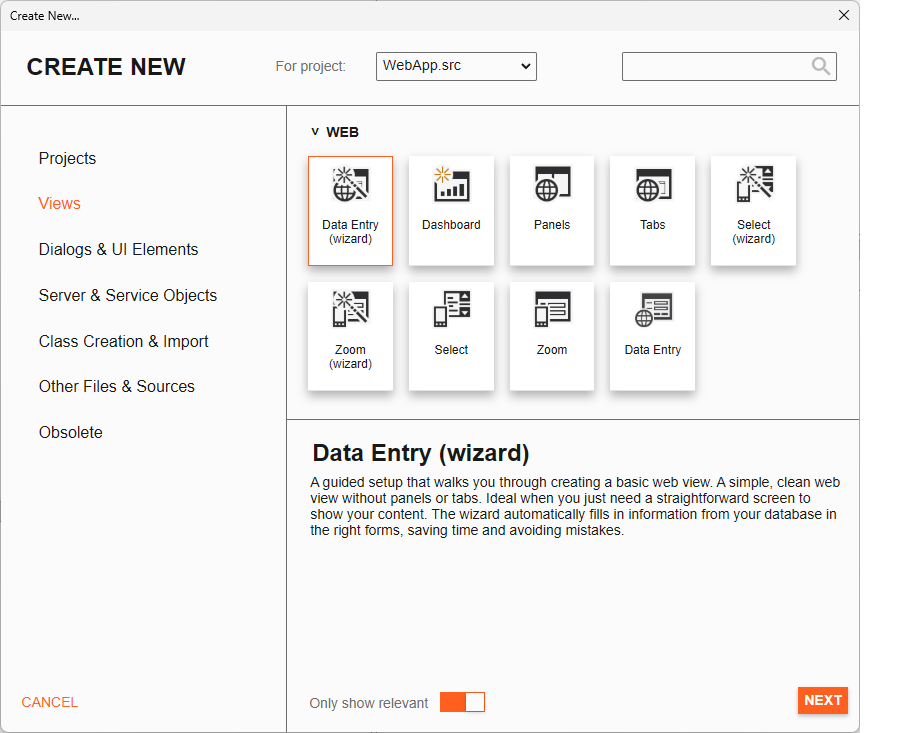
Some of the improvements that have been made to make it more accessible:
- Only project types will show when opening the create new dialog in a workspace without a project, steering new users towards creating a project and not something else.
- Most names and descriptions have been changed to make it more clear what a wizard does, some descriptions also link to the learning center to explain certain concepts.
- Added a only show relevant checkbox that only shows wizards usable for the current project type.
- Works in both light and dark mode.
Hardening (Improved Security) of All DataFlex Applications
To continue updating security in DataFlex applications, in 26.0 we focused on runtime application security. What this means is that we turned on hardening settings on the actual DataFlex runtime. This will improve a lot of results for security audits. With version 26.0, DataFlex now successfully passes the https://github.com/microsoft/binskim executable tests. We will continue improving this even further in the future.
Through testing, there as some runtime issues that might arise from our code which we explain below.
-
DataExecutionPrevention (DEP) — A hardware and software security feature in operating systems like Windows that stops malicious code from running in memory areas meant for data. The expected impact of this at runtime is practically none.
-
Control Flow Guard (CFG) — A Windows platform security feature designed to prevent memory corruption attacks by enforcing strict checks on where an application's code can execute. It places tight restrictions on indirect calls, making it significantly harder for attackers to hijack program control flow. Since DataFlex is a programming language/runtime, the chances were already relatively low. Expected impact is practically none.
-
Address Space Layout Randomization (ASLR) — A crucial cybersecurity defense that randomizes memory locations for program components (stack, heap, libraries, executable) to thwart memory corruption attacks like buffer overflows, making it difficult for attackers to predict addresses and inject malicious code, thereby increasing system security by adding unpredictability to exploits.
Through testing it has come to light that some non-conforming 64-bit code might pose issues. We have seen cases where
External_Functioncalls that should have aPointerType parameter. For example, CreateMutexA(Handle(Pointer, Integer, Pointer))was defined as(Handle(Integer, Integer, Integer))because under 32-bit, a pointer fit into an integer. Because we didn't have address randomization turned on by coincidence, passed pointers might have fit into the passed values, while now they are sliced, losing the upper bytes, as now they might be bigger than an integer more often. This means that if you see weird behavior concerningExternal_Functioncalls, be …
Excel Import
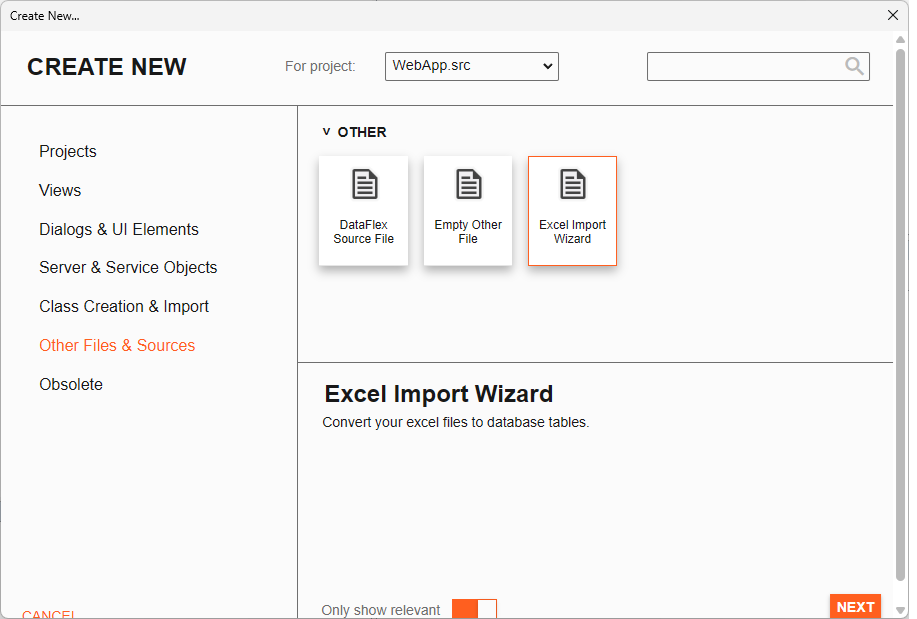
This new wizard lets you convert an Excel sheet into a database. This has support for both SQL and embedded database backends. The wizard is capable of automatically detecting the best data type for each column. It is also capable of checking if a field can be used as a primary key. If it is not capable of finding a field that could act as a primary key it will prompt you to automatically create a new primary key field using the DFLastId logic.
You can start this wizard from the 'Other Files & Sources' tab of the Create New dialog (File > Create New in the Studio).
Import Studio Preferences
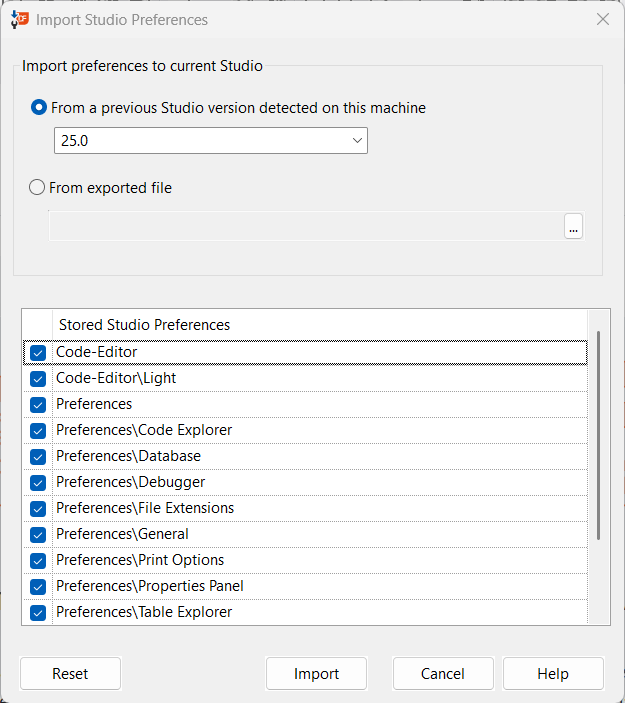
A new dialog to allow for the reset of the current customizations and selection of preference settings to be imported is available in the Tools menu. Import either from previous versions of DataFlex detected on your machine or from an external JSON file generated by the also new Export Studio Preferences option.
Export Studio Preferences
Generate a JSON file containing settings that may be imported by the Studio to apply your customizations to other systems.
Studio Editor Improvements
The Studio's CodeMax code editor gains several navigation and readability improvements:
- Ctrl+Click navigation and Ctrl+Hover cues — Ctrl+hover highlights a symbol and Ctrl+click jumps to its definition.
- Highlight all occurrences — occurrences of the identifier under the cursor are highlighted. You can choose when this happens: always on, only when the identifier is selected, or off.
- Horizontal mouse-wheel scrolling — the editor now supports native horizontal scrolling.
Reproducible Builds
DataFlex 26.0 produces reproducible executables: compiling the same application content twice yields the same result. This makes build verification and anti-virus allow-listing more reliable, and pairs with committing your .sws.lock file for reproducible CI builds.
Compatibility Notes
For a step-by-step guide to upgrading an existing workspace, see Migrating Existing Workspaces to DataFlex 2026.
Workspace File Formats have Changed in DataFlex 26.0
To support the Package manager, the formats of Studio workspace (.SWS) files and workspace configuration files (.WS files) will be converted.
- After migrating a workspace to 26.0, the Studio will convert your
.SWSfile format from INI to JSON. This will take the workspace paths from theConfig.wsfile and move them into the JSON SWS file. From this point on, theConfig.wsfile is generated and will only be needed in a deployment environment. - If you want to change your workspace paths, you can do that in the
.SWSfile. The next time you open the workspace in the Studio or change the paths via the "Configure Workspace" panel, theConfig.wsfile will be updated.
If you intend to continue working on the same workspaces in older versions of DataFlex, you will need to maintain .SWS and .WS files in the old formats for this purpose.
DfComp and DFCompConsole have been Removed
If you use dfcomp or dfcompconsole, make sure to read about and test their replacement, df-cli. dfcomp and dfcompconsole do not understand the new workspace file format and have been removed in DataFlex 26.0.
For almost all builds, use df-cli build — it builds a workspace and the targets bound to it, resolving the dependency tree and makepath for you:
df-cli build "Order Entry.sws" --target "Order.src" --toolchain windows-64
df-cli build-file compiles a single file the way dfcompconsole did, outside the context of a workspace's dependency tree. It is not recommended unless you know exactly what you are doing — its main legitimate use is precompiling a header before building the targets:
df-cli build-file "AppSrc/OrderPrecompile.pkg" --workspace "Order Entry.sws" --toolchain windows-64 --precompile
df-cli build "Order Entry.sws" --target "Order.src" --toolchain windows-64
See Command Line Interface for the full command reference.
Library Order and MakePath
Library order in .sws files is no longer used; the makepath is now driven by your dependency tree. Before 26.0 the makepath was built from your dependencies in declaration order, so large workspaces that grew across many revisions may have relied on that order rather than on a correct dependency tree, and can now require dependency-tree fixes to build. Declare dependencies instead of relying on order — see Package Manager and Migrating Existing Workspaces to DataFlex 2026 for how to resolve makepath issues.
The .sws and .sws.lock Files
DataFlex 26.0 workspaces have both an .sws file and an .sws.lock file. The .sws file always supersedes the lock file and specifies the version constraints for packages; the .sws.lock file records the exact version currently selected within those constraints. Always consider them together and commit both to version control. Because the lock file pins exact versions, committing it makes df-cli build reproducible in CI — a pipeline will not break because a dependency published a new version overnight. See CI/CD Integration.
Global Package Cache
Package dependencies are deduplicated in a new global cache at C:\ProgramData\DataFlex\Packages\Cache, so packages are not installed side by side repeatedly. The cache auto-prunes weekly once no links remain, and enables offline project creation by falling back to the newest cached version.
cIniFile Class Reimplemented
The cIniFile class has been rewritten. It now does not rely on the old Windows APIs that were originally designed to work with the registry and had some Unicode issues. The cIniFile class is intended to be backwards compatible. Its new base cIniProcessor class does the actual lifting.
Note that when reading or writing multiple values / sections, it is now more efficient to use the cIniProcessor APIs directly as it reads and parses the whole INI in memory and then writes it out again. Use ParseString or ReadFromFile to load ini data, use Stringify or WriteToFile to generate / save the data. Use functions like SetValue and GetValue to read / manipulate values.
Note that the class assumes INI files to contain UTF-8 data and ignores BOM values when reading.
Updated Minimum MSSQL Client Version
The default minimum client version for MSSQL has been updated to version 13.
We had the default set to version 10, the client for SQL Server 2008. We now updated it to use a more recent client version. The new default is set to 13, that comes with SQL Server 2016. That may impact your development as well as deployment environments.
Codejock controls have been updated to the latest released version (24.3.0)
There should be no impact on compiling your programs, but we encourage you to test your Windows applications.
Registration Codes
DataFlex 25.0 (and earlier) registration codes are not accepted to run DataFlex 26.0. New 26.0 registration codes are issued for subscribers.
SerializeObject(cWebObject) Compatibility warning
The signature SerializeObject of cWebObject has changed. This private function is known to be augmented in subclasses. This will now result in compiler errors. Classes can be adjusted to use the new PreSerializeObject or PostSerialieObject messages (which are private messages, but intended to be overridden by subclasses of cWebObject) or the public OnLoad event.
DacAbout.bmp replaced by DataFlexAbout.bmp
DacAbout.bmp has been replaced by DataFlexAbout.bmp as part of reviewing our standard About dialog. If your project uses our standard About dialog, you may need to rescan images for the project so DacAbout.bmp gets replaced with DataFlexAbout.bmp in the project’s CFG file. To do that in the Studio, open your project and select Project | Project Properties | Bitmaps tab and click on Scan for images…